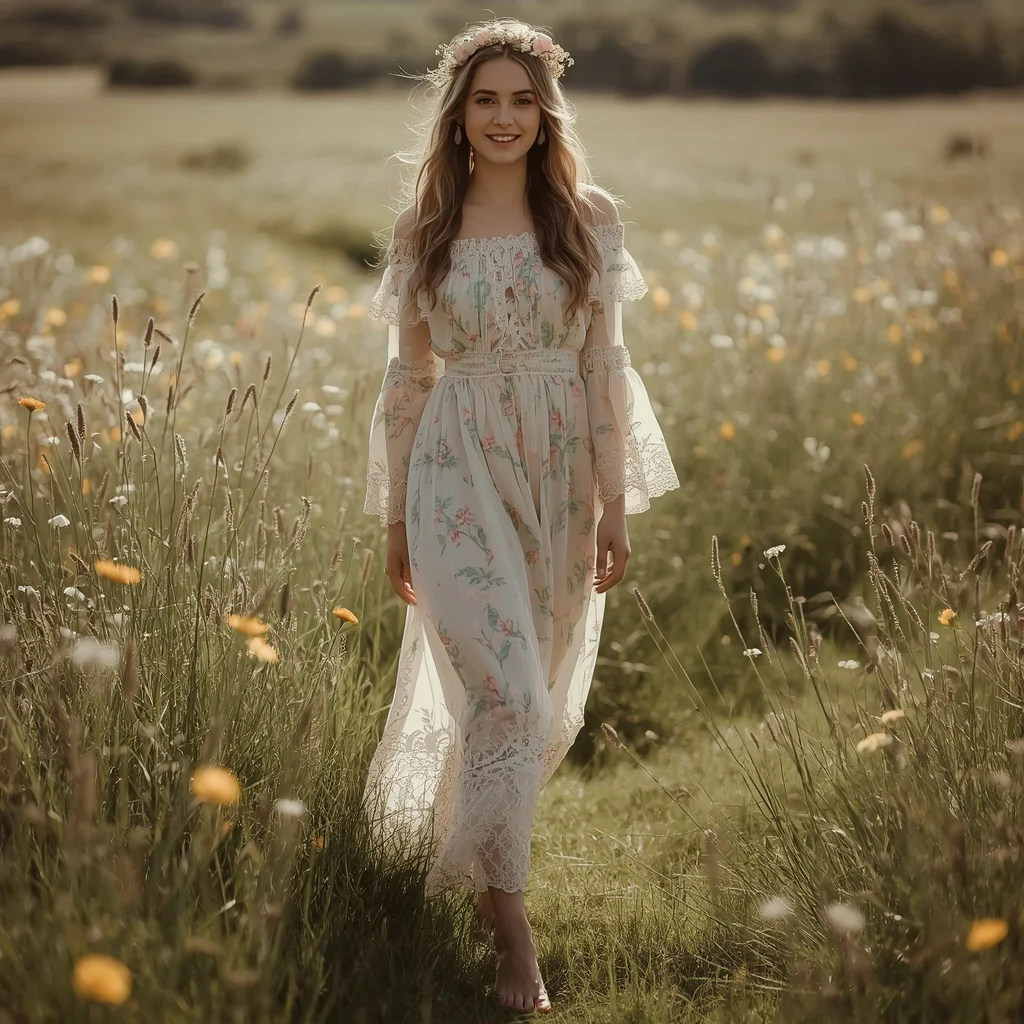
Prairie Elegance: Embroidered Tulle and Soft Silhouettes | Breathtaking Full-body Model
Few prompts capture the romance of open landscapes and high-fashion delicacy quite like the Prairie Elegance concept. It blends the untamed beauty of a vast prairie with the refined craftsmanship of a couture-inspired western dress, giving you a portrait that feels both grounded and ethereal.
This article breaks down exactly what the prompt asks for, why it works so well, and how you can adapt it for your own AI image generations. You will find practical steps, style variations, tool recommendations, and fixes for common issues—all designed to help you produce a stunning full-body model shot with soft, diffused light and intricate textile details.
What this prairie elegance prompt is asking for
The prompt describes a full-body fashion portrait set in a wide-open prairie beneath an overcast sky. The model wears an ivory tulle gown with embroidered wildflowers and equestrian motifs, paired with a corset bodice and sheer long sleeves. Soft, undone waves and minimalist silver jewelry complete the look, while diffused natural light emphasizes the transparency of the fabric.
- Vast, open prairie field under a soft, overcast sky
- Floor-length dress made of layered ivory tulle
- Intricate embroidery featuring delicate wildflowers and subtle equestrian motifs
- Fitted corset-style bodice and a flowing, romantic skirt
- Sheer, long-sleeved overlay adding modesty and grace
- Soft, undone waves and minimalist silver jewelry
The scene the prompt builds around the model
The environment is a "vast, open prairie field under a soft, overcast sky," which immediately sets a calm, expansive mood. The overcast lighting acts as a giant softbox, eliminating harsh shadows and wrapping the model in even, diffused light that feels almost painterly.
Inside this setting, the dress becomes the focal point. Clauses like "ethereal, floor-length western dress made of layered ivory tulle" and "intricately embroidered with delicate wildflowers and subtle equestrian motifs" ground the image in texture and craftsmanship. The contrast between the wild prairie and the refined garment creates a narrative of elegance meeting nature.
Why this prompt produces such a striking image
This prompt succeeds because it layers specific fashion details onto a universally appealing natural backdrop. The overcast sky, ivory tulle, and wildflower embroidery work together to produce a soft, romantic aesthetic that AI models interpret with remarkable consistency. The full-body framing ensures the entire silhouette and dress movement are captured, making it ideal for fashion-focused outputs.
- The soft, overcast sky eliminates harsh lighting, making fabric transparency and embroidery details easier for the AI to render cleanly.
- Combining wildflowers and equestrian motifs gives the dress a unique, recognizable character that stands out from generic gown prompts.
- A full-body pose in an open field provides strong compositional guidance, helping the model avoid awkward cropping or floating limbs.
Three style directions that stay true to this prompt
While the core prompt has a clear aesthetic, you can shift the mood without breaking its essence. The three styles below keep the prairie setting, the ivory tulle dress, and the overcast light intact, only adjusting atmosphere, color grading, or texture emphasis.
- Editorial fashion: Emphasize high-contrast detailing on the embroidery and a more dramatic, windswept pose to mimic a luxury magazine spread.
- Painterly fine art: Apply a soft, almost impressionistic finish that blends the tulle layers into the prairie grasses for a dreamlike, museum-worthy portrait.
- Vintage romantic: Introduce a subtle sepia or muted pastel color grade and soften the focus slightly to evoke a timeless, heirloom-photograph feel.
How to generate this prairie elegance portrait step by step
Start by copying the full prompt into your chosen AI image tool, then refine the output with a reference photo and careful quality checks. The steps below cover the entire workflow from prompt entry to final selection.
- Copy the prompt. Paste the complete Prairie Elegance prompt into your generator's text field without alterations on the first run.
- Upload a reference photo. Provide a full-body reference image of a person in a long dress or standing pose to guide proportions and fabric flow.
- Generate initial images. Run the prompt and produce at least four variations so you can compare embroidery clarity and tulle transparency.
- Check the hands. Zoom in on every hand. If fingers are fused or misshapen, inpaint or use a negative prompt like "bad hands, extra fingers."
- Check the face and dress embroidery. Ensure the face looks natural and the wildflower embroidery reads clearly. Adjust the prompt weight for "intricately embroidered" if the stitching blurs.
- Select and upscale the best result. Pick the image where the layered tulle, soft overcast light, and prairie background all harmonize, then upscale for final use.
Choosing the right reference photo for this look
A well-chosen reference photo helps the AI understand posture, lighting direction, and the relationship between the model and the open landscape. The goal is to anchor the generated image in realistic proportions while leaving room for the prompt's fantasy details.
- Use a full-body shot of a person standing in an open outdoor space with overcast or soft natural light to mirror the prairie atmosphere.
- Pick a reference where the subject wears a long, flowing garment so the AI can map the tulle skirt's movement and volume accurately.
- Avoid references with busy backgrounds or harsh direct sunlight, which can confuse the model and override the prompt's soft, diffused lighting.
AI tools that handle this prompt well
Different generators interpret fabric, lighting, and natural settings with varying degrees of realism. The table below compares four popular options and notes how each one handles a specific detail from this prompt.
| Tool | Access | Typical realism | Useful here for |
|---|---|---|---|
| ChatGPT | DALL·E integration | High, with strong prompt adherence | Rendering the layered ivory tulle transparency accurately |
| Google Gemini | Imagen integration | Very high, photorealistic | Capturing the soft, overcast sky and diffused natural light |
| Leonardo AI | Web platform, free tier available | High, excels at fantasy and fashion | Detailing the intricate wildflower embroidery on the dress |
| Midjourney | Discord subscription | Very high, artistic and cinematic | Balancing the flowing, romantic skirt with the vast prairie background |
Three tips to get the best tulle and embroidery result
Small adjustments to your prompt or generation settings can dramatically improve how the ivory tulle and wildflower embroidery appear. These tips focus on the real materials and objects named in the prompt.
- Add "fine thread texture" or "visible stitching" after the embroidery description to force the AI to render the wildflower details with more definition.
- Use a negative prompt like "shiny satin, heavy fabric" to prevent the layered ivory tulle from looking thick or glossy instead of sheer and airy.
- Mention "minimalist silver jewelry" again in a negative prompt as "no large or ornate jewelry" if the AI over-accessorizes and distracts from the dress.
Common issues and how to fix them
Even a well-written prompt can produce flawed results. The table below addresses four frequent failures and the specific changes that correct them.
| Issue | What to change |
|---|---|
| The tulle looks like solid cotton or satin | Add "sheer, translucent tulle" and increase weight on "layered" to emphasize airy fabric. |
| Wildflower embroidery is blurry or missing | Rephrase as "crisp, high-contrast embroidery of wildflowers and equestrian motifs" and reduce any style keywords that soften details. |
| The overcast sky renders as a flat gray wall | Include "soft, textured clouds" or "subtle cloud depth" and lower the CFG scale slightly to avoid oversaturation. |
| Hands or fingers are distorted | Add "perfect hands, detailed fingers" to the positive prompt and "bad anatomy, fused fingers" to the negative prompt, then inpaint if needed. |
Frequently Asked Questions
Can I change the dress color and still keep the prairie elegance feel?
Yes, you can replace "ivory tulle" with soft pastels like blush, sage, or powder blue. Keep the layered tulle and wildflower embroidery descriptions intact to maintain the same ethereal, romantic quality.
What should I do if the model's face looks unnatural or distorted?
Add a face-focused positive prompt like "symmetrical, natural face, soft expression" and use a negative prompt with "disfigured, asymmetric features." If the issue persists, generate the image at a higher resolution or use a face-restoration tool after generation.
Is this prompt suitable for generating close-up portraits instead of full-body shots?
The prompt is optimized for full-body framing to show the dress and prairie. For a close-up, you would need to rewrite the framing instructions and potentially lose the skirt and landscape context, so it is best used as written for full-body results.
Conclusion
Prairie Elegance works because it gives the AI a complete visual story: a specific location, a detailed garment, and a defined lighting condition. When you combine the layered ivory tulle, wildflower embroidery, and soft overcast prairie light, the generator has enough rich information to produce a cohesive, beautiful image without guesswork. Use the tips and tool recommendations in this guide to refine your outputs, and do not hesitate to experiment with the three style directions to make the prompt your own while preserving its signature softness and grace.
Once you have your final image, you can edit the photo to fine-tune colors or remove small imperfections, provided you hold the rights to make those edits.