

Best 10 Saree with Bindi AI Prompts for Classic Indian Beauty
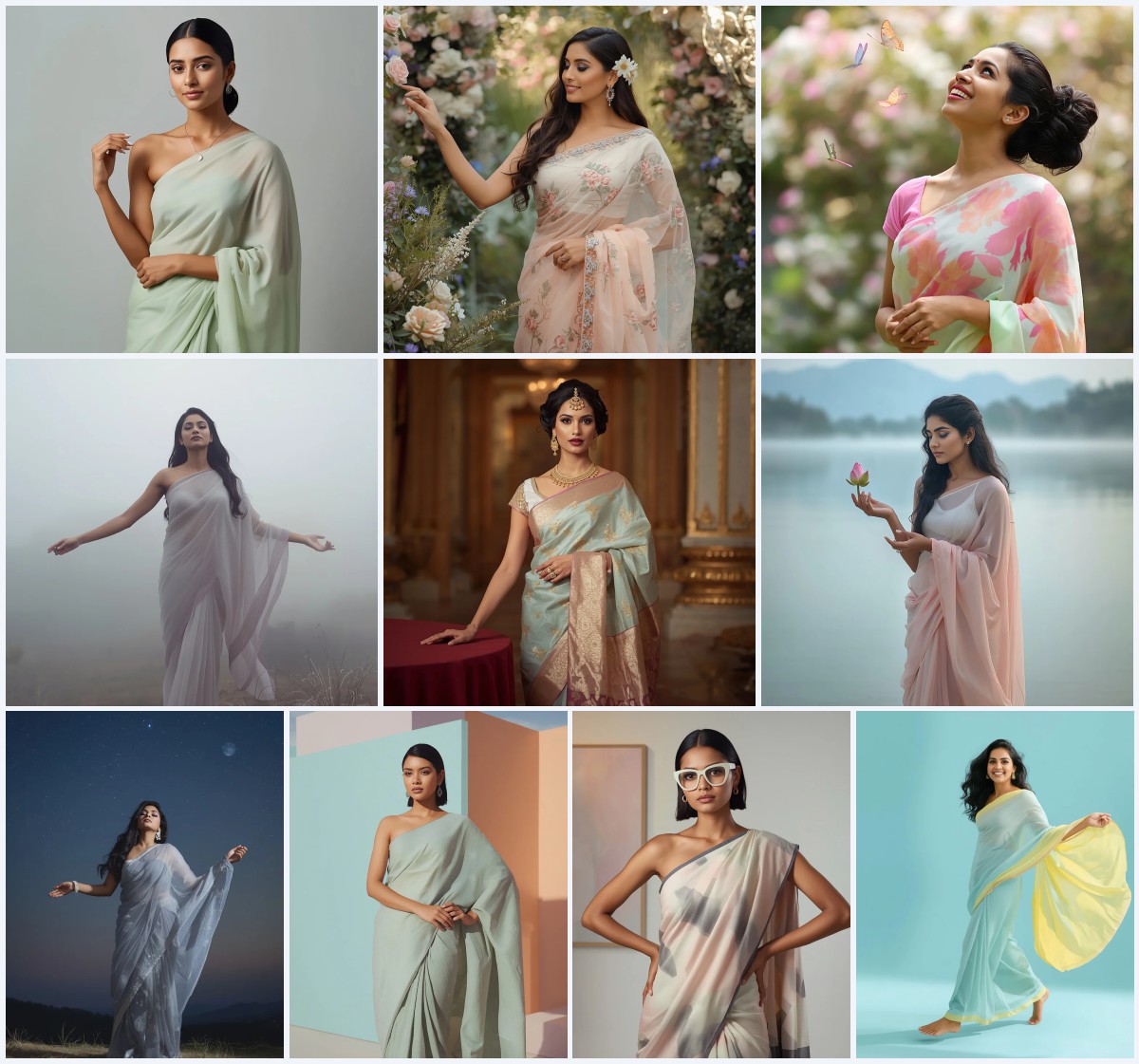
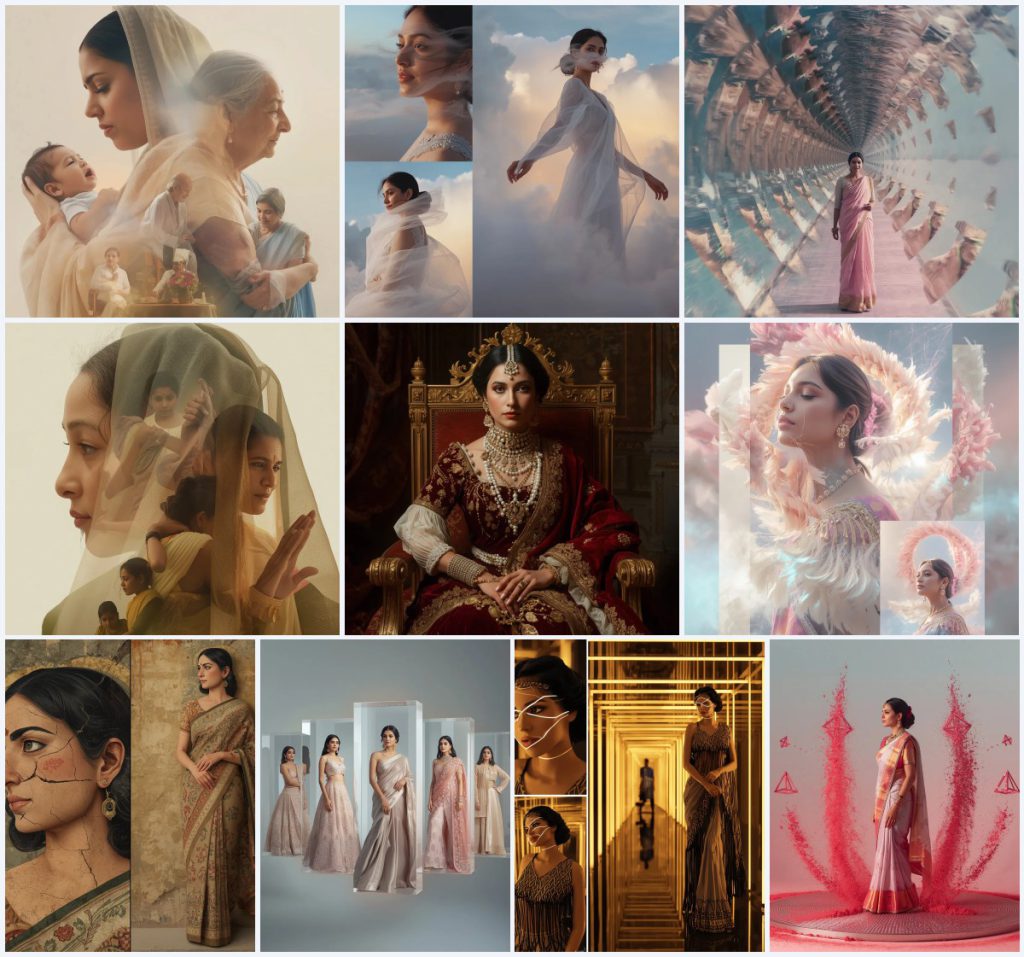
This collection brings together ten distinct AI image prompts that center on the saree and bindi as anchors of classic Indian beauty. Each prompt is a complete visual recipe, blending fabric, pose, lighting, and cultural detail. The set ranges from a serene motherhood narrative to ethereal cloud formations, from a recursive time loop to Baroque opulence. Every prompt uses the saree as a constant, while the bindi—though not always named—is implied in the traditional styling that makes these portraits feel authentic. The collection is designed for anyone who wants to generate portraits that honor Indian elegance without falling into clichés.
What makes this set useful is its variety. You get a royal Maharani in crimson velvet, a dreamy collage with feather spirals, an ancient fresco in brocade, a floating glass collage of festive wear, an Art Deco light tunnel, and levitating ruby dust with sacred geometry. Each prompt specifies lens, lighting, and resolution, so you can copy and paste directly into your favorite AI tool. The shared thread is the saree and the bindi as symbols of grace, and the prompts invite you to explore motherhood, resilience, royalty, and futurism through that lens. Whether you are a beginner or a seasoned prompt engineer, these ten prompts offer a rich starting point for classic Indian beauty portraits.
What these saree with bindi prompts are asking for
These prompts ask for highly detailed, cinematic portraits of Indian women wearing sarees, often with a bindi as a subtle but defining feature. They are not simple one-line requests; each prompt layers fabric, pose, lighting, background, and emotional tone. The collection includes both single portraits and collages, but all share a commitment to realism and cultural specificity. You will find instructions for close-ups, side profiles, and full-body stances, often within the same image. The prompts also specify camera settings like 85mm lens, HDR, and 4k resolution, which guide the AI toward a polished, editorial look.
- A soft cream and pastel blue saree for a motherhood narrative, with overlapping stages of life.
- An airy organza saree that blends into swirling cloud formations with pastel hues.
- A festive pastel saree caught in a recursive time loop with floating time fragments.
- A deep crimson velvet saree with gold zari and freshwater pearls for a Maharani portrait.
- A traditional brocade saree rendered in the style of ancient frescoes with cracks and faded colors.
- A modern Art Deco-inspired saree with geometric patterns and beaded fringes inside a light tunnel.
Setting the scene across ten distinct worlds
Each prompt builds its own world. In the motherhood narrative, the scene is 'a deeply heartfelt narrative composition' where a young mother calms her crying baby and an older mother embraces grandchildren, all 'overlapping in one beautiful frame.' The cloud prompt places the woman 'against a backdrop of soft, swirling cloud formations,' with 'delicate cloud wisps around her face.' The time loop prompt shows 'echoes of her presence appear across layered temporal dimensions,' with 'floating time fragments forming a circular loop structure.' The Maharani sits 'on a gilded throne adorned with intricate carvings' inside 'a sumptuous palace interior with dark, ornate tapestries.'
The feather spiral collage surrounds the woman with 'feather spirals forming an aura around her,' while the fresco prompt makes each frame 'appear as a painted segment on a crumbling wall.' The floating glass collage suspends 'transparent glass panels' in space, each highlighting a different outfit. The Art Deco prompt places her 'within a glowing, geometric light tunnel,' and the ruby dust prompt has her 'standing on an enormous vibrating metal plate where high-frequency soundwaves cause crushed ruby dust to levitate into perfect 3D sacred geometric structures.' These scenes are not random; they are carefully described to give the AI clear spatial and lighting cues.
Why this collection works for classic Indian beauty
First, it respects the saree as a versatile canvas. The prompts show that the same garment can be regal, ethereal, historical, or futuristic, which keeps the output fresh. Second, the bindi—while not always explicitly named—is part of the traditional styling that these prompts assume, so the results feel authentically Indian without being costumey. Third, the prompts include technical specifications like lens, lighting, and resolution, which reduce guesswork and help you achieve a consistent, high-quality look across different AI tools. Whether you want a tender motherhood portrait or a surreal time loop, these prompts give you the vocabulary to describe it precisely.
- The saree remains a constant while the setting and mood change, so you can explore many aesthetics without losing cultural grounding.
- The implied bindi and traditional jewelry add a subtle authenticity that makes portraits feel classic rather than generic.
- Detailed camera and lighting instructions make the prompts portable across ChatGPT, Gemini, Leonardo AI, and Midjourney.
Three styles you can pull from this set
This collection offers three distinct stylistic directions. Each one is fully contained within the prompt text, so you can adopt it without adding outside elements. The first is a narrative collage style, where multiple moments overlap in a single frame. The second is an ethereal, cloud-like aesthetic with soft pastels and diffused light. The third is a historical or opulent style, drawing on Baroque grandeur or ancient fresco techniques. These three cover a wide emotional range, from tender to dreamy to majestic.
- Narrative collage: Use the motherhood prompt's approach of overlapping a young mother calming her baby with an older mother embracing grandchildren, all in one frame.
- Ethereal pastel: Follow the organza saree prompt's soft, swirling clouds and pastel hues, with delicate wisps around the face and a heavenly glow.
- Baroque opulence: Adopt the Maharani prompt's deep crimson velvet, gold zari, freshwater pearls, and chiaroscuro lighting on a gilded throne.
How to use these prompts step by step
Using these prompts is straightforward, but a few steps will improve your results. Start by choosing one prompt from the collection that matches your desired mood. Then follow the steps below to generate a polished portrait. Remember that each prompt is self-contained, so you can copy it exactly as written. If you want to combine elements from two prompts, do so carefully to avoid conflicting lighting or pose instructions.
- Copy the prompt. Select the full text of your chosen prompt, from the first word to the last, and paste it into your AI tool's input field.
- Upload a reference. If the tool allows, upload a reference photo of a person or a saree to guide the AI's interpretation of fabric and facial features.
- Generate the image. Run the generation with default settings first, then adjust aspect ratio or seed if you want variations.
- Check hands. Inspect the hands for extra fingers or awkward poses, especially in full-body stances and overlapping collage frames.
- Check face. Verify that the face looks natural and matches the described expression, such as a radiant close-up or a serene profile.
- Check the main object. Confirm that the saree, bindi, and any specified background—clouds, throne, light tunnel—are rendered clearly and correctly.
Choosing a reference photo that helps
A good reference photo can make the difference between a generic output and a striking portrait. For these prompts, you want a photo that shows the saree drape clearly, the face at a useful angle, and the overall lighting you hope to achieve. Avoid photos with heavy filters or extreme angles, as they can confuse the AI. If you are generating a collage, a single clear reference of the person is enough; the AI will handle the multiple frames based on the prompt text.
- Use a well-lit photo where the saree's fabric and pleats are visible, so the AI can replicate the drape and texture.
- Choose a front-facing or three-quarter view of the face to help the AI capture the bindi and facial features accurately.
- Avoid busy backgrounds in your reference; a plain wall or outdoor setting with soft light works best for these detailed prompts.
Which AI tools handle these prompts well
Different tools have different strengths. The table below compares four popular options based on access, typical realism, and what they are useful for with this specific collection. Keep in mind that results vary by version and settings, so experiment with each to see which fits your workflow. The last column mentions a real detail from one of the prompts to show how the tool might handle it.
| Tool | Access | Typical realism | Useful here for |
|---|---|---|---|
| ChatGPT | Free and paid tiers | Moderate to high, depending on model | Generating the narrative motherhood collage with overlapping stages, as it handles complex scene descriptions well. |
| Google Gemini | Free with Google account | High for photorealistic portraits | Rendering the ethereal organza saree with cloud wisps, thanks to its strength in soft, diffused lighting. |
| Leonardo AI | Free credits, paid plans | Very high, with fine texture control | Capturing the Baroque Maharani's deep crimson velvet and gold zari details on a gilded throne. |
| Midjourney | Paid subscription | Excellent for artistic and cinematic styles | Creating the Art Deco light tunnel with sharp geometric lines and high-contrast gold and black lighting. |
Three tips for better saree and bindi portraits
These tips focus on real materials and objects mentioned in the prompts. They will help you avoid common pitfalls and get closer to the intended look. Keep them in mind as you iterate on your generations.
- When working with the velvet saree prompt, specify 'deep crimson velvet' and 'gold zari' clearly; if the AI muddles the texture, add 'heavy embroidery' to reinforce the richness.
- For the organza saree, mention 'light, airy organza' and 'pastel hues' to prevent the fabric from looking stiff or opaque; the prompt already includes these terms, so keep them intact.
- In the fresco prompt, the 'weathered, textured look' with 'cracks running across her portrait' is key; if the output looks too clean, add 'ancient frescoed wall' to the background description.
Common issues and how to fix them
Even with detailed prompts, AI tools can produce unexpected results. The table below lists four issues that are likely with this collection and what to change in your prompt or settings to address them. These are not theoretical; they stem from the complexity of the scenes and the specificity of the cultural details.
| Issue | What to change |
|---|---|
| The bindi is missing or misplaced | Add 'a small red bindi on her forehead' explicitly to the prompt, as some tools may overlook it when focusing on the saree. |
| The saree drape looks unnatural | Include 'traditional saree drape with pleats at the waist' and 'pallu over the left shoulder' to guide the AI's fabric rendering. |
| Overlapping collage frames merge into a blur | Reduce the number of overlapping stages from five to three, and specify 'clear separation between frames' in the prompt. |
| Lighting is too harsh for pastel tones | Change 'cinematic lighting' to 'soft, diffused lighting' and add 'pastel color palette' to keep the mood gentle. |
Frequently Asked Questions
Can I use these prompts without mentioning a bindi?
Yes, the prompts themselves do not always name the bindi, but the traditional styling implies it. If you want a bindi, add 'a small red bindi' to the prompt. If you prefer without, simply omit it; the saree alone still creates a classic Indian look.
Which prompt is best for a beginner?
The ethereal cloud formation with organza saree is the most forgiving because it uses soft, diffused lighting and a simple background. The motherhood collage and time loop prompts are more complex due to overlapping frames, so save those for when you are comfortable with the tool.
How do I get the ruby dust levitation effect to look realistic?
Use the exact phrase 'crushed ruby dust to levitate into perfect 3D sacred geometric structures' and specify 'high-frequency soundwaves' and 'vibrating metal plate.' If the effect looks flat, add 'luminous red gemstone streams' and 'cinematic lighting with luminous crimson edges' to enhance depth.
Conclusion
This collection of ten saree with bindi AI prompts offers a rich spectrum of classic Indian beauty, from tender motherhood to surreal time loops and opulent royalty. Each prompt is a complete recipe with specific fabrics, poses, lighting, and camera settings. By following the steps and tips outlined above, you can generate portraits that feel both authentic and artistic. Remember to check hands, face, and the main object after each generation, and don't hesitate to tweak the prompt to suit your vision. With practice, these prompts will help you create stunning, culturally grounded images that stand out.
Always ensure you have the right to edit and use any reference photo you upload, respecting the person's privacy and your local laws.